Every developer has seen it: a request that takes five seconds when it should take fifty milliseconds. A server that grinds to a halt under load. A background job that starves every other operation.
The root cause is almost always the same: a fundamental misunderstanding of how threads, processes, and concurrency actually work.
This isn’t a beginner tutorial. It’s a frank, practical look at the mechanics that separate systems that survive production from those that buckle under pressure. We’ll walk through real examples in Go, Node.js, and C#, and by the end, you’ll have a much clearer picture of which model fits your next project.
The Foundation: What Is a Process?
Before you can understand concurrency, you need to understand what the operating system is actually managing.
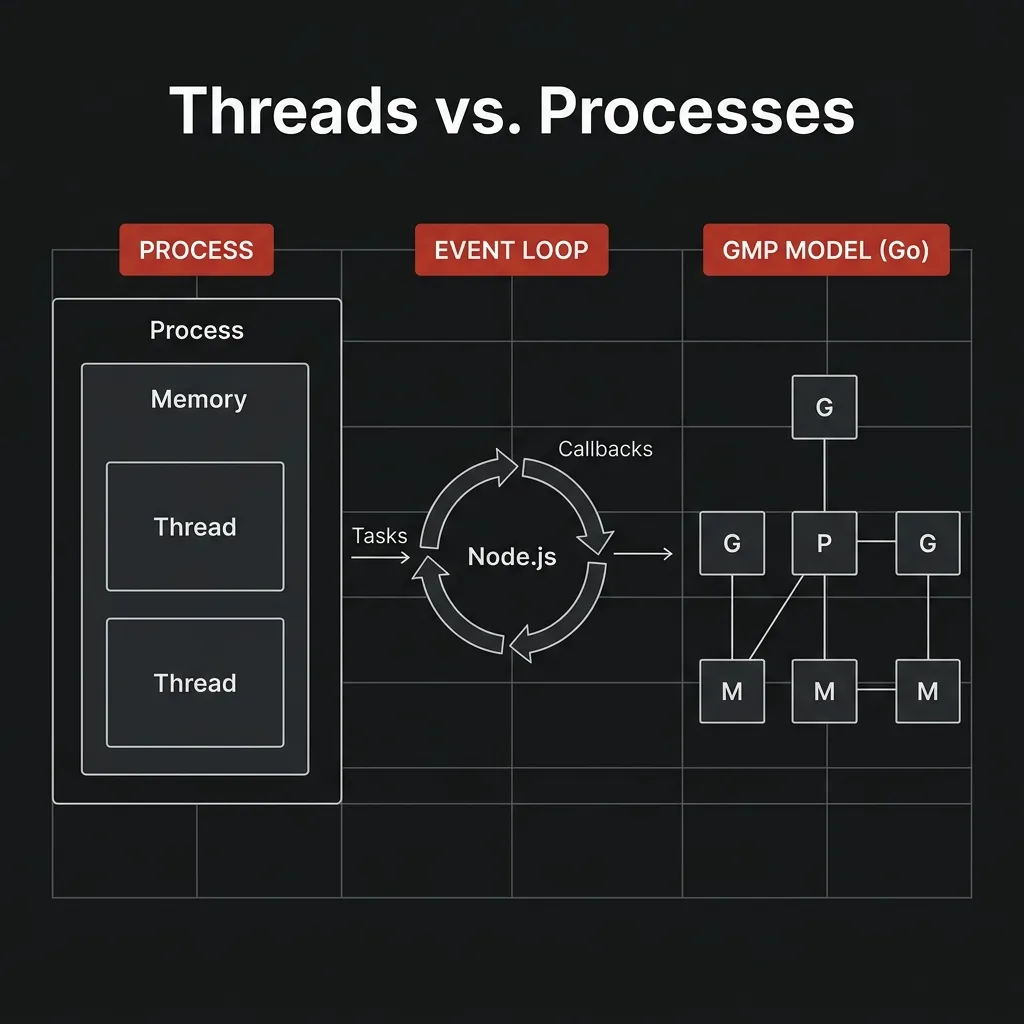
A process is an isolated execution environment created by the operating system. Think of it as a sealed container. It gets its own:
- Private memory space (heap, stack, code segment)
- File descriptor table
- OS resources (network sockets, handles)
- At least one thread (the main thread)
Because processes are isolated, one crashing process cannot corrupt the memory of another. This is the same reason your browser runs each tab in a separate process. If one tab dies, your other tabs keep running.
flowchart TD
    subgraph Process_A ["PROCESS A (Isolated)"]
        direction TB
        T1["Thread 1"]
        T2["Thread 2"]
        SM["Shared Memory"]
        T1 --- SM
        T2 --- SM
    end

    subgraph Process_B ["PROCESS B (Isolated)"]
        direction TB
        T3["Thread 1"]
        IM["Isolated Memory"]
        T3 --- IM
    end
Processes are isolated. Process B cannot read Process A’s memory. Period.
What Is a Thread?
A thread is a unit of execution within a process. All threads inside the same process share the same memory and resources.
This is both the power and the danger of threads.
The Power: Thread 1 can write a value to memory, and Thread 2 can immediately read it. No serialization, no copying, no message passing overhead.
The Danger: Thread 1 and Thread 2 can both try to write to the same memory location at the same time. This is called a race condition, and it produces bugs that are notoriously hard to reproduce and diagnose.
sequenceDiagram
    participant T1 as "Thread 1"
    participant T2 as "Thread 2"
    participant C as "Counter (Memory)"

    T1->>C: "Read (value = 5)"
    T2->>C: "Read (value = 5)"
    Note over T1, T2: "Both read before anyone writes"
    T1->>C: "Write (value = 6)"
    T2->>C: "Write (value = 6)"
    Note right of C: "Race Condition: Value should be 7"
This is exactly why synchronization primitives like mutexes, locks, and semaphores exist. They force threads to take turns accessing shared resources.
The Real Cost of OS Threads
Here’s something most tutorials gloss over: OS threads are expensive.
Creating a new thread requires a kernel call. Each thread consumes a fixed amount of memory just for its stack:
| Resource | Typical Size |
|---|---|
| OS Thread Stack | 1 MB – 8 MB |
| Kernel Context for Thread | ~10 KB |
| Creation time | ~1-10ms (kernel call) |
On a server with 4 GB of RAM, if each thread uses 2 MB, you can have at most ~2,000 concurrent threads. That’s it. Your connection count is bounded by your memory.
This is the core problem that all three of our languages solve, just in very different ways.
Node.js: The Single-Threaded Reactor
Node.js takes the most radical approach: run all JavaScript on a single thread.
At its core, Node.js is built on the event loop pattern. Instead of creating a new thread for every request (like traditional servers did), it handles everything through a queue of callbacks on a single thread. For blocking operations like file I/O and DNS lookups, it delegates to libuv, a C library that manages a small pool of background threads so your main thread stays free.
flowchart TD
    IT["Incoming Tasks"] --> EQ["Event Queue"]
    EQ --> EL["Event Loop - Single Threaded"]
    EL -- "Sync Tasks" --> JS["Execute JavaScript"]
    EL -- "Async Tasks" --> LT["Libuv Thread Pool"]
    EL -- "System Tasks" --> OK["OS Kernel"]

    style EL fill:#c0392b,color:#fff
When you write fs.readFile(), Node does not block your main thread. It tells the operating system, “when this is done, notify me,” and immediately goes back to handling other requests.
// This is NON-BLOCKING. Node.js keeps running other code while the file is being read.
const fs = require('fs');

console.log('Starting...');

fs.readFile('./data.json', 'utf8', (err, data) => {
  // This callback runs when the OS says "done!" - could be later
  console.log('File loaded:', data.length, 'bytes');
});

console.log('...this runs BEFORE the file is loaded.');

// Output:
// Starting...
// ...this runs BEFORE the file is loaded.
// File loaded: 1024 bytes
If this model is new to you, Philip Roberts’ JSConf talk is the best visual explanation out there. It’s 26 minutes and it’ll change how you think about JavaScript forever:
💡 For a deeper look at the event loop phases and how async I/O works under the hood, the official Node.js documentation and the libuv docs are both surprisingly readable.
The Trap: CPU-Bound Work
The event loop model is brilliant for I/O, but it has a sharp edge. If you’re doing heavy computation (parsing 100MB of JSON, generating thumbnails, complex encryption), you block the entire event loop. Every other request queued behind it just waits.
// ❌ DANGEROUS: this blocks all other requests for ~2 seconds
app.get('/report', (req, res) => {
  const result = heavyCPUComputation(); // blocks the event loop!
  res.json(result);
});

// ✅ CORRECT: offload to a Worker Thread
const { Worker } = require('worker_threads');

app.get('/report', (req, res) => {
  const worker = new Worker('./heavy-task.js');
  worker.on('message', (result) => res.json(result));
});
When to reach for Node.js: APIs that are network and database heavy. Real-time applications (WebSockets, chat). Microservices that mostly do I/O and forward data.
When to look elsewhere: Image/video processing. Scientific computing. Anything that would block the event loop for more than a few milliseconds.
C#: Async/Await and the Thread Pool
C# takes the “managed thread pool” approach. Rather than one thread or unrestricted threads, it gives you a pool of OS threads managed by the .NET runtime.
The async/await pattern is a compiler trick that makes asynchronous code look synchronous:
// This looks like it blocks, but it doesn't
public async Task<string> FetchDataAsync(string url)
{
    var client = new HttpClient();

    // 'await' suspends this method here, releases the thread back to the pool.
    // The thread can now handle other requests while we wait for the HTTP response.
    string response = await client.GetStringAsync(url);

    // When the response arrives, the runtime picks up a thread from the pool
    // to continue execution here.
    return response;
}
The key insight: await is not Thread.Sleep(). It does not block a thread. It suspends the method and releases the thread back to the pool, where it can pick up other work. When the I/O completes, any available thread continues where you left off.
// Handle 10,000 concurrent requests with a small thread pool
public async Task HandleRequestAsync(HttpContext ctx)
{
    // Thread is released during these awaits
    var user = await _db.GetUserAsync(userId);
    var orders = await _db.GetOrdersAsync(userId);
    var result = await _cache.GetAsync(cacheKey);

    await ctx.Response.WriteAsJsonAsync(result);
    // A thread from the pool only occupies CPU time when actually computing,
    // not while waiting for I/O
}
💡 If you want to understand what the C# compiler actually generates behind async/await (the state machine, the SynchronizationContext, the thread pool interaction), Microsoft’s async programming guide is thorough and well-structured.
Parallelism with Task.WhenAll
For true parallel execution, C# provides Task.WhenAll. You fire multiple async operations and wait for all of them simultaneously:
// ❌ Sequential: total time = 300ms + 200ms + 400ms = 900ms
var user = await GetUserAsync();
var orders = await GetOrdersAsync();
var analytics = await GetAnalyticsAsync();

// ✅ Parallel: total time = max(300, 200, 400) = 400ms
var (user, orders, analytics) = await Task.WhenAll(
    GetUserAsync(),
    GetOrdersAsync(),
    GetAnalyticsAsync()
);
When to reach for C#: Long-running enterprise applications. Mixed I/O and CPU workloads. Systems where you need both async I/O and true parallelism on CPU-bound tasks. The .NET ecosystem and its Azure integration make it a strong fit for large-scale cloud services.
Go: Goroutines and the GMP Scheduler
Go is where concurrency gets genuinely elegant. The Go team built a user-space scheduler that multiplexes lightweight goroutines onto a small set of OS threads. This is called an M:N model (M goroutines on N OS threads).
         Goroutines (thousands)
        G  G  G  G  G  G  G  G
        ↓  ↓  ↓  ↓  ↓  ↓  ↓  ↓
  ┌─────────────────────────────┐
  │         Go Scheduler        │
  │  P0 [G G G]  P1 [G G G]   │  ← P = Logical Processor
  └──────┬───────────┬──────────┘
         │           │
        M0          M1          ← OS Threads (few, expensive)
         │           │
  ┌──────▼───────────▼──────────┐
  │        Operating System     │
  └─────────────────────────────┘
The numbers that matter: an OS thread starts at 1–8 MB of stack. A goroutine starts at ~2 KB and grows as needed. You can comfortably run one million goroutines on a single machine.
// Launch a goroutine with the 'go' keyword
func main() {
    // This runs concurrently, not blocking main
    go func() {
        processOrder(orderId)
    }()

    // You can launch thousands of these
    for _, job := range jobs {
        go processJob(job) // each is ~2KB, not 2MB
    }

    fmt.Println("All jobs launched!")
}
Channels: Communicating Without Locks
Go’s design philosophy is simple: “share memory by communicating, rather than communicate by sharing memory.”
Instead of reaching into shared variables and hoping your mutex holds, you pass data through channels:
func producer(ch chan<- int) {
    for i := 0; i < 10; i++ {
        ch <- i  // send value into the channel
    }
    close(ch)
}

func consumer(ch <-chan int, results chan<- int) {
    for value := range ch {
        results <- value * value  // process and forward
    }
}

func main() {
    jobs := make(chan int, 10)
    results := make(chan int, 10)

    // Launch workers
    for w := 0; w < 3; w++ {
        go consumer(jobs, results)
    }

    // Send work and collect results, no mutexes needed
    go producer(jobs)

    for r := range results {
        fmt.Println(r)
    }
}
What happens when a goroutine blocks?
This is where Go’s scheduler really shines. If a goroutine makes a blocking system call (say, a slow database query), the Go runtime detaches the OS thread from its processor (P) and parks it with the goroutine. The runtime then hands the P to a new OS thread so that the remaining goroutines in the queue continue running. The CPU is never sitting idle waiting for one blocked goroutine.
💡 For a detailed walkthrough of the GMP scheduler internals (run queues, work stealing, and how blocking syscalls are handled), this Ardan Labs deep dive is one of the best available. For the foundational theory, Rob Pike’s “Concurrency is not Parallelism” is essential reading.
When to reach for Go: High-concurrency APIs (thousands of simultaneous connections). Network services and proxies. Background job processing. Anything where you’re managing lots of independent tasks simultaneously. Kubernetes, Docker, and most of the modern cloud infrastructure layer are written in Go for exactly these reasons.
Side-by-Side: The Real Comparison
Scenario: Handle 10,000 simultaneous database queries

Node.js:
  - 1 main thread + libuv thread pool
  - Each query callback waits in the event queue
  - ✅ Excellent for I/O, event loop was designed for this
  - ❌ One slow synchronous query blocks ALL others

C#:
  - Thread pool (e.g., 50 threads)
  - Each await releases its thread while waiting
  - ✅ Excellent, thread pool handles the async efficiently
  - ❌ More memory overhead than Go

Go:
  - 10,000 goroutines, ~4-8 OS threads
  - Each blocked goroutine parks, scheduler runs others
  - ✅ Excellent, lowest memory overhead (~20MB vs ~2GB for OS threads)
- ✅ True parallelism on multi-core hardware| Go | Node.js | C# | |
|---|---|---|---|
| Concurrency Model | M:N Goroutines | Single-Threaded Event Loop | Thread Pool + async/await |
| Parallelism | ✅ Native (GOMAXPROCS) | ⚠️ Worker Threads only | ✅ Native (Thread Pool) |
| Memory per concurrent task | ~2 KB | ~N/A (single thread) | ~1 MB (thread pool thread) |
| CPU-bound work | ✅ Excellent | ❌ Blocks event loop | ✅ Good (use Parallel.For) |
| I/O-bound work | ✅ Excellent | ✅ Excellent | ✅ Excellent |
| Deadlock risk | Low (channels) | Very Low (single-threaded) | Moderate (locks/mutexes) |
| Learning curve | Moderate | Low | Moderate–High |
The Practical Takeaway
There is no “best” model. There is only fit for context:
-
Node.js is the right choice when you need to build quickly, your workload is I/O-bound, and your team knows JavaScript. Its simplicity (one thread, no race conditions in your code) is a genuine strength for most backend APIs.
-
C# is the right choice for long-lived enterprise systems where you need a strong type system, a rich ecosystem (Azure, .NET libraries), and the ability to mix async I/O with CPU-heavy work cleanly.
-
Go is the right choice when you are explicitly optimizing for high-concurrency, low-latency systems. If you’re writing a proxy, a job scheduler, a payment gateway, or anything that needs to handle ten thousand connections at once while staying within tight memory budgets, Go’s model is the most efficient tool available today.
The engineers who build systems that stay up under pressure aren’t the ones who memorized the most syntax. They’re the ones who understand what the machine is actually doing when their code runs.
That’s the difference between writing code and engineering systems.
Further Reading & Resources
🚀 What the heck is the event loop anyway? ↗ by Philip Roberts (JSConf EU)
🚀 Concurrency is not Parallelism ↗ by Rob Pike
🚀 Go Concurrency Patterns ↗ (Google I/O)
💡 The Node.js Event Loop ↗ Official Documentation
💡 Scheduling in Go: The Go Scheduler ↗ by Ardan Labs
💡 Asynchronous Programming in C# ↗ Microsoft Learn
💡 .NET Managed Thread Pool ↗ Microsoft Learn
🚀 The Anatomy of a Payment Transaction ↗ Deep dive into financial infrastructure
💡 Communicating Sequential Processes (CSP) ↗ on Wikipedia
This technical article is part of the Ellomas Technologies Knowledge Repository. We specialize in building high-reliability digital infrastructure for credit, utilities, and financial services.